


永久提高生命值、护甲、DPS 等(适用于 PC 与 PS4 存档)
使用存档编辑器修改武器和服装属性;修改前务必备份存档。PS4 存档可用,但操作前需要使用 Save Wizard for PS4 MAX。DPS 示例是为武器添加 DPS Constant 属性并设置数值。
这是一个 AutoHotkey 脚本,可阻止驾驶时摄像机在几秒没有鼠标输入后自动朝向前方。可运行 EXE、用 AutoHotkey 加载脚本,或将代码复制到现有脚本中。
这并非传统意义上的模组,而是一个 AutoHotkey 脚本:驾驶时若几秒没有移动鼠标,它会阻止摄像机自动朝向前方。
.ahk 文件;可在游戏开始前或游戏过程中加载。使用下载或粘贴的脚本时,需要安装 AutoHotkey。来源说明提供的 AutoHotkey 地址为:www.autohotkey.com。
进入游戏并坐上载具后,按鼠标中键启动脚本。脚本每半秒让摄像机轻微上下移动,以防止自动居中;驾驶时通常不太明显。下车后再次按鼠标中键即可停止。若要更换按键,可将脚本中的 MButton 替换为自己偏好的按键或鼠标键。
1.1 版更新:现已支持第一人称驾驶;在第一人称视角下,轻微的摄像机移动会更明显。
#IfWinActive Cyberpunk 2077 (C) 2020 by CD Projekt RED

Pause On

Loop
{
    MouseMove, 0, 1,, R
    Sleep, 400
    MouseMove, 0, -1,, R
    Sleep, 400
}

MButton::Pause

Return
Download this zip file, extract the .ahk script to your desktop, then double-click it to run it with AutoHotkey in the background while you play.
You need AutoHotkey installed already for this version to work. (www.autohotkey.com)
前往 N 网打开所选文件。安装与下载要求以原作者及平台说明为准。
<!-- aoe-mods-source:nexusmods:cyberpunk2077:523 -->
使用存档编辑器修改武器和服装属性;修改前务必备份存档。PS4 存档可用,但操作前需要使用 Save Wizard for PS4 MAX。DPS 示例是为武器添加 DPS Constant 属性并设置数值。
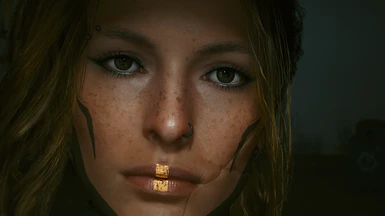
替换游戏中的多种眼妆与唇妆:包括飞翼眼线、猫眼线、小飞翼眼线、小猫眼线、Grunge 眼线及口红样式;另提供深色猫眼线与飞翼眼线版本。

一款《赛博朋克 2077》破解协议求解工具,可自动识别矩阵代码和序列,并通过发送按键自动完成破解。支持选择恶魔、强制自动破解、优化数据挖掘奖励、自定义热键和声音提示等功能,也支持 GeForce NOW。
