


永久提高生命值、护甲、DPS 等(适用于 PC 与 PS4 存档)
使用存档编辑器修改武器和服装属性;修改前务必备份存档。PS4 存档可用,但操作前需要使用 Save Wizard for PS4 MAX。DPS 示例是为武器添加 DPS Constant 属性并设置数值。
移除猩猩手臂义体的外观,让手臂看起来更自然,适用于 VTK。将压缩包内容放入《赛博朋克 2077》主目录;加载顺序应为自定义纹身、本模组、VTK。
本模组移除猩猩手臂义体的外观,使其看起来像普通手臂。作者制作此补丁,是为了在使用 Void 的 Lace Blackwork 纹身时也能使用猩猩手臂。作者提到,Subtle Gorilla Arms 可能已不再适用,或与 VTK 不兼容。
本模组面向 VTK。依赖信息指出,VTK Vanilla HD Body for FemV 并非绝对必需,但没有它时手臂可能出现接缝和颜色不正确的问题。
作者建议安装 Ballistic Coprocessor Modifications,以隐藏握把;也建议安装 Metallic and Glowy Nails,让猩猩手臂上显示指甲。作者另建议搭配 Lace Blackwork - VTK Tattoos。
将压缩包内容放入《赛博朋克 2077》主目录。以 Steam 安装为例,模组文件应位于:
Cyberpunk 2077\archive\pc\mod\
如果出现问题,先检查加载顺序。作者指出,.archive 模组通常按字母顺序加载,部分模组会使用文件名前缀调整顺序。正确顺序应为:自定义纹身、本模组、VTK。
示例:
###_void_Lace_Tattoos_A_armleft.archive
##yv_vtk_subtle_gorilla_arms.archive
xBaebsae_VanillaHD_Arms.archive
以下顺序不正确:
###_void_Lace_Tattoos_A_armleft.archive
xBaebsae_VanillaHD_Arms.archive
yv_vtk_subtle_gorilla_arms.archive
以下顺序也不正确:
##yv_vtk_subtle_gorilla_arms.archive
void_Lace_Tattoos_A_armleft.archive
xBaebsae_VanillaHD_Arms.archive
若修改文件名仍无法解决,可手动编辑与 .archive 文件位于同一目录的 modlist.txt,或使用 Archive Conflict Checker Tool 调整加载顺序。若纹身仍显示不正确,作者表示可以尝试提供帮助。
以下内容仅为作者列出的截图搭配,不代表本模组的必需前置。
角色外观:
Equipment-EX 模组:
作者:Yvonne。
Removes gorilla arms appearance. Updated readme
前往 N 网打开所选文件。安装与下载要求以原作者及平台说明为准。
<!-- aoe-mods-source:nexusmods:cyberpunk2077:16860 -->
使用存档编辑器修改武器和服装属性;修改前务必备份存档。PS4 存档可用,但操作前需要使用 Save Wizard for PS4 MAX。DPS 示例是为武器添加 DPS Constant 属性并设置数值。
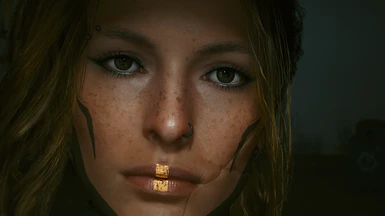
替换游戏中的多种眼妆与唇妆:包括飞翼眼线、猫眼线、小飞翼眼线、小猫眼线、Grunge 眼线及口红样式;另提供深色猫眼线与飞翼眼线版本。

一款《赛博朋克 2077》破解协议求解工具,可自动识别矩阵代码和序列,并通过发送按键自动完成破解。支持选择恶魔、强制自动破解、优化数据挖掘奖励、自定义热键和声音提示等功能,也支持 GeForce NOW。
