[**NEW **3.0.3.0]
Facufierro's document formatter (Thanks!)
(Shift+Alt+F)
// Comment highlighting
Handles are no longer built on activation, to save some memory when not working with bg3 files
use BG3: Build handle references from the command palette (Ctrl+Shift+P) to activate the feature
[NEW] Code completion
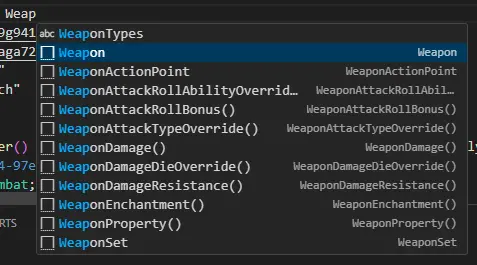
The below has been rolled into this to show (most) keywords/functions.
~~Ive also included the valuelist.txt, modifiers.txt and functions i parsed from the unpacked data, if you put them in the same workspace as your mod, it will allow you to tab complete things much easier. e.g. Pref>PreferredCastingAbility. lists may not be comprehensive. ~~
[NEW] Handles on Hover
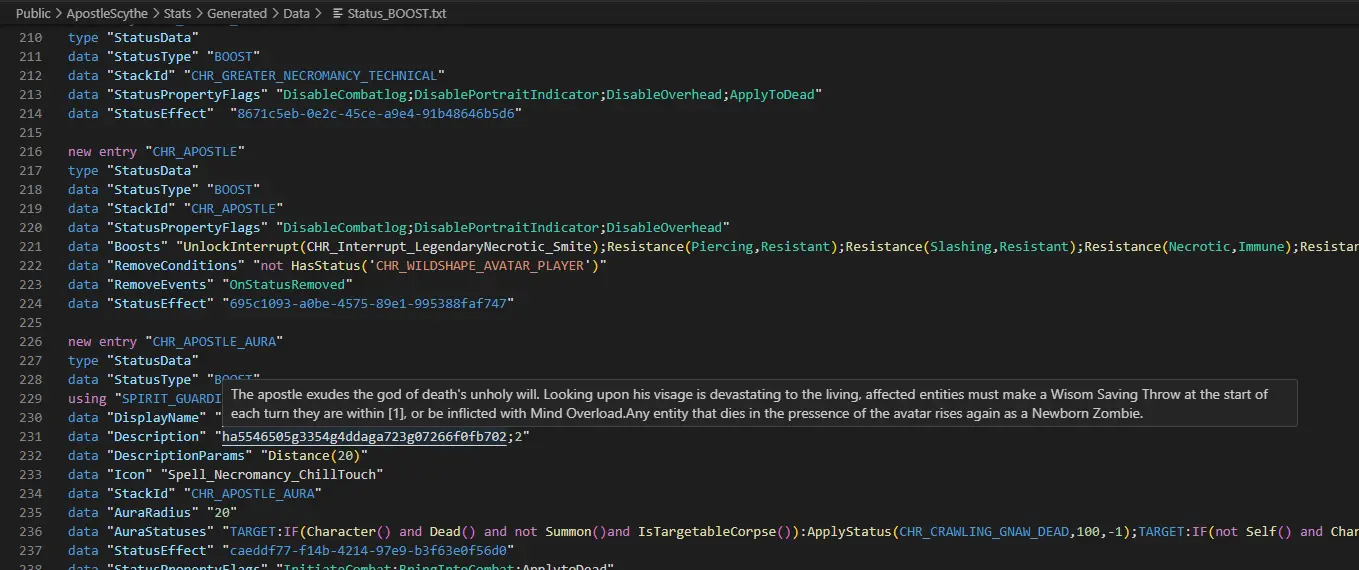
**
Currently only English is supported**, this will look in english.xml and your mods localization file to show the associated text on hover
If you add a new handle it will require rebuilding to show up, hit ctrl+shift+P and type bg3, click rebuild handle references, then new entries will also show up.

**INSTALLATION **
**Notepad++
**
Language>User Defined Language>Import
Import the .xml file in the User Defined Languages setting to enable,
colours can also be configured here.
**VSCode
[PRIOR TO v3.0.0.0]**
Simply drop the bg3-text-support folder into the extensions folder
On Windows at:
C:\Users<USER PROFILE>.vscode\extensions
[v3.0.0.0 ONWARDS]
click extensions in vscode, then the three dots, and then install from vsix, navigate to the provided vsix file, and done

[NEW] or just search on the extension marketplace, there are a few others there it looks like, including one that was almost at the same time as me aha, but mine is bg3-text-support
May be issues or mistakes/missing keywords, especially in the notepad++ version, as i have less control there, let me know if you find any in the comments :)
来源与文件
文件说明
.zip file containing the different files needed for notepad++ and vscode.
前往 N 网打开所选文件。安装与下载要求以原作者及平台说明为准。
<!-- aoe-mods-source:nexusmods:baldursgate3:2594 -->




