Want more?
Check out my dragonborn mods on **Nexus **and [ModIO
](https://mod.io/u/akelka/)Mod progress video and trailers on [YouTube
](https://www.youtube.com/@AkELkA_dds)Take a peek at the Mods queue and share your ideas on the [Chaos Forge
](http://www.patreon.com/posts/120844669)

[youtube]gNQFahisiXQ[/youtube]
--------------------------------------------------------------------------------------------------------------------------------------------------------------------------------------------
Modder's Tool/ Non-Playable Resource
The programm for merging Armor Root Templates and Equpment Races file
**It does NOT ADD or CREATE armor, it merges existing files
It makes armor from mods to NOT BOTCH EACH OTHER when they touch same armor root templates**
Examples of patches made trough this patcher in optional files of ClawStep - Clawstep Lazy Armor Patch ones
And yes, u could use my patches to patch in some extras if you want, just put them as Vanilla EQR and as Custom EQR
Pre-Patch Setup:
1. Unpack the game with ShinyHobo's ** BG3 Modders Multitool**
You need specifically Root Templates files and EqipmentRaces
**Unpacked Data of Vanilla **
Root Templates
Gustav
UnpackedData\Gustav\Public\Gustav\RootTemplates
UnpackedData\Gustav\Public\GustavDev\RootTemplates
UnpackedData\Gustav\Public\Honour\RootTemplates
GustavX
UnpackedData\GustavX\Public\GustavX\RootTemplates
Patch8_HotFix3
UnpackedData\Patch8_HotFix3\Public\Shared\RootTemplates
Patch8_HotFix1
UnpackedData\Patch8_HotFix1\Public\Shared\RootTemplates
Shared
UnpackedData\Shared\Public\Shared\RootTemplates
UnpackedData\Shared\Public\SharedDev\RootTemplates
Vanilla EqupmentRases
UnpackedData\Shared\Mods\SharedDev\EquipmentSettings\EquipmentRaces.lsx
2. Unpack mods you want to patch with ShinyHobo's **BG3-Modders-Multitool
**
3. Convert lsf files to lsx with Norbyte's lslib
Patch Setup:
**Run the BG3_Armor_Patcher.exe
**
Vanilla path
✧ Select the path to your UnpackedData folder:

✧ You could** find the path to the folder with ShinyHobo's BG3-Modders-Multitool **like that:
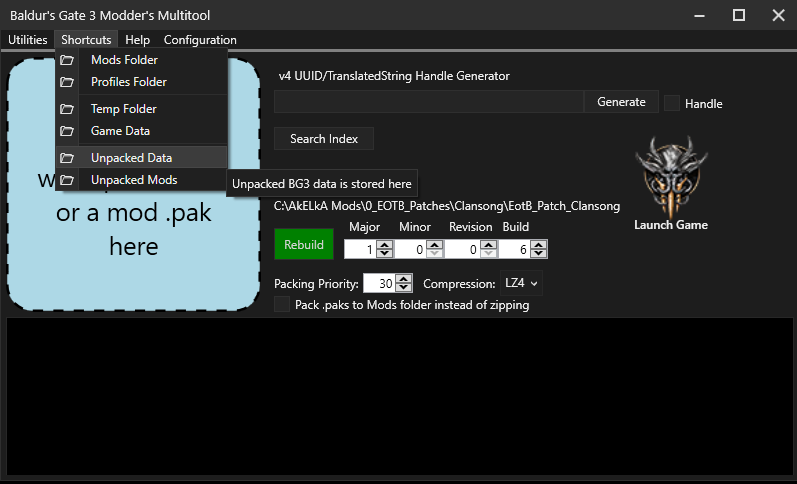
✧ Programm would find upacked Vanilla RootTemplates and EqupmentRaces file itself
✧ Programm would use this info as base for merge to fill up info if mods lack it
Now let's look at mods you are patching
Vanilla EQR
**✧ If mod uses Vanilla equpment race **(changes assembly of armor for existing EqupmentRaces, e.g. Clawstep)
you fill it up in the Vanilla EQR (Vanilla EqupmentRace)
**✧ If mod uses same Vanilla equpment race, but made to partually override some mod, u put there both of mods **( e.g. Clawstep and it's partual override DragonLord's Breasty Clothes)
✧ Click "+" button
Now you got right and left panels
✧ In the left you select path to upacked mod folder
Here is example of setup for Clawstep and it's partual override DragonLord's Breasty Clothes if needed to be merged with something else:
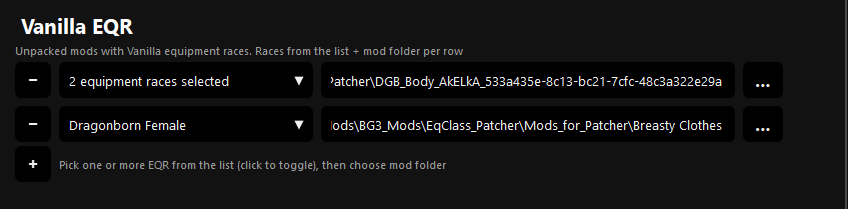
✧ On the right you select one or more Vanilla EqupmentRace

Custom EQR
**✧ If mod uses Custom equpment race **(new body type/shape with armor for it, one that should be added to assembly, e.g. labotor's Wine and Revelry (Satyr Race), CobaltOwl's Tabaxi, Abraham's Dragonborns body type 3/4) you fill it up in the Custom EQR (Custom EqupmentRace)
**
✧ Click "+" button**
Now you got right and left panels
✧ In the left you select path to upacked mod folder
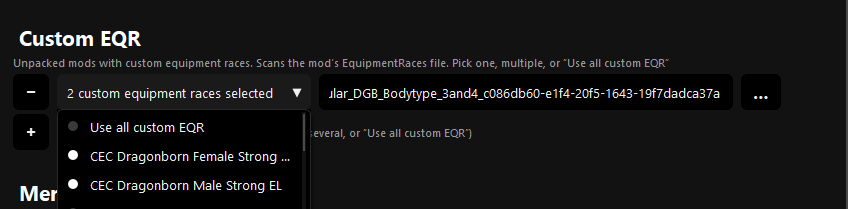
✧ Programm automaticly scans the mod for EqupmentRaces file and give u a list of it in the right panel
**You could select 1/multiple on select "Use all custom EQR" from the mod
**
Here is example of setup for Abraham's Dragonborns body type 3/4
Merge Order
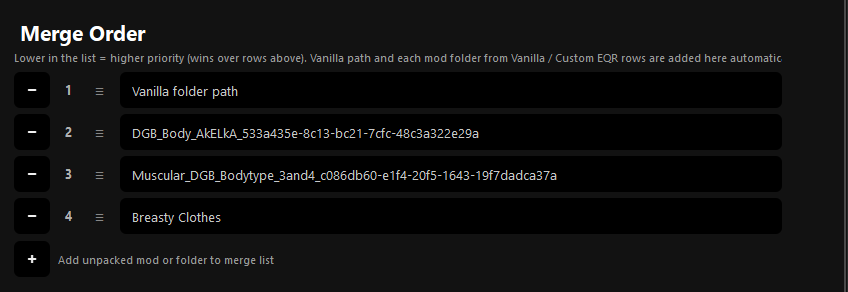
**✧ Vanilla and mods you selected in Vanilla EQR and Custom EQR added in order list automatically
✧ You could reorder the merge** by holding the 3 lines icon and dragging it
For example DragonLord's Breasty Clothes should be lower in list then Clawstep, since they touch same EqupmentRace positions, and u want Breasty Clothes to override Clawstep partually
"+" and "-" buttons here just in case, in most cases you would not need to add or remove mods in order by hand
**Presets
✧ You could save your own presets and load them when needed, you could rename existing ones

✧ The NAME of Preset is the Name which would be used as MOD name in folder path**
**e.g. Patch_Folder\PresetName\Public\ PresetName\RootTemplates
Patch_Folder\ PresetName\Mods\PresetName\EquipmentSettings**
**Patch Folder
** ✧ Make some folder (or select some premade mod you include patch in) and select it as Patch Folder the merged mod assembly would be packed there
** **
**Example of assembly
Full assemblyfor patching Clawstep, DragonLord's Breasty Clothes and Abraham's Dragonborns 3/4 body types together
 **
**PATCH
** ✧ Hit the big PATCH button

✧ When finished the program would tell you how many files it patched
✧ Programm only patch root templates touched by any of selected mods, only of objects, ignoring any other root templates
**--------------------------------------------------------------------------------------------------------------------------------------------------------------------------------------------
**
Patch to mod
**✧ You could select some empty mod to patch things in or copy paste the files into some mod, it's on your choosing. **
You control the folders names by preset name
**✧ If you made empty mod trough toolkit you should convert RootTemplate's lsx to lsf **with Norbyte's lslib before copy paste into the mod
**✧ If you made empty mod "oldschool" you could use lsx as it is and pack **it trough ShinyHobo's BG3-Modders-Multitool like you would do with any other mod
Why it also merges EqupmentRaces together?
I noticed that if you making toolkit mod (especially if u do that for console) u need full EqupmentRaces file, which contains Vanilla ones as well, to make mod run properly. If you do that purely for Nexus and know what u are doing u could skip this file
--------------------------------------------------------------------------------------------------------------------------------------------------------------------------------------------
**Mod Order
✧ Just drop your patch lower in the order then mods you patched
**
If you need more info poke me in my Discord - Molten Mug
Thanks
Wall of Heroes
With every name added, the Wall of Heroes grows stronger
Today, we honor Gold, KoboldicOddities, DarthRevan, N00b, Oliver, SmugFly, xicara, ash** **whose generosity fuels these creations
Your support is seen, valued, and deeply appreciated!
**Echoing Acknowledgement **
to Wamp, Freedom-In-Moonlight Lunaria, Pinkie Pain, Merven, luna, Director Isard, Erzebet, SkullBaster, MaxStrengthWizard, Wolfman, Vincent Ottevaere, you are tentacular!

来源与文件
文件说明
better merge for difficult inheritance
前往 N 网打开所选文件。安装与下载要求以原作者及平台说明为准。
<!-- aoe-mods-source:nexusmods:baldursgate3:22848 -->




