Formerly known as - Improved Robe Of Summer
- A mod for Baldur's Gate 3 -
clintmich
Mod Manager Support

-FULL RELEASE COMPATIBLE-
Improved Halsin Reward
This mod improves the reward given for the quest "Rescue The Druid Halsin" to be more of a fitting gift, after rescuing him from the Goblin camp.
**
Featuring
** Custom Fireball and Lightning spells
The Reward
After defeating the Goblin Camp, and returning to the Druid Den to meet up with Halsin, you're asked to speak with Rath.
He will give you the Rune of the Wolf, which opens the stairway to the Hidden Vault in the Enclave Library.
Once you're in the Vault, check the chest on the far right side of the room. Inside will be the Robe of Summer.
Which is the vanilla reward for this quest line, but additionally, you will now find a Cape of the Master Druid.
This beautifully crafted Druid Cape grants the wearer Beast Speech(Speak With Animals) and a Magic of the Master Druid spell container.

The "Cape of the Master Druid" grants the wearer the following:
- Gives the player access to "Magic of the Master Druid" spell container
- Gives the player Beast Speech(Speak with Animals) ability

Only one spell from the container "Magic of the Master Druid" can be used per short rest.
All spells use an Action Point to cast.
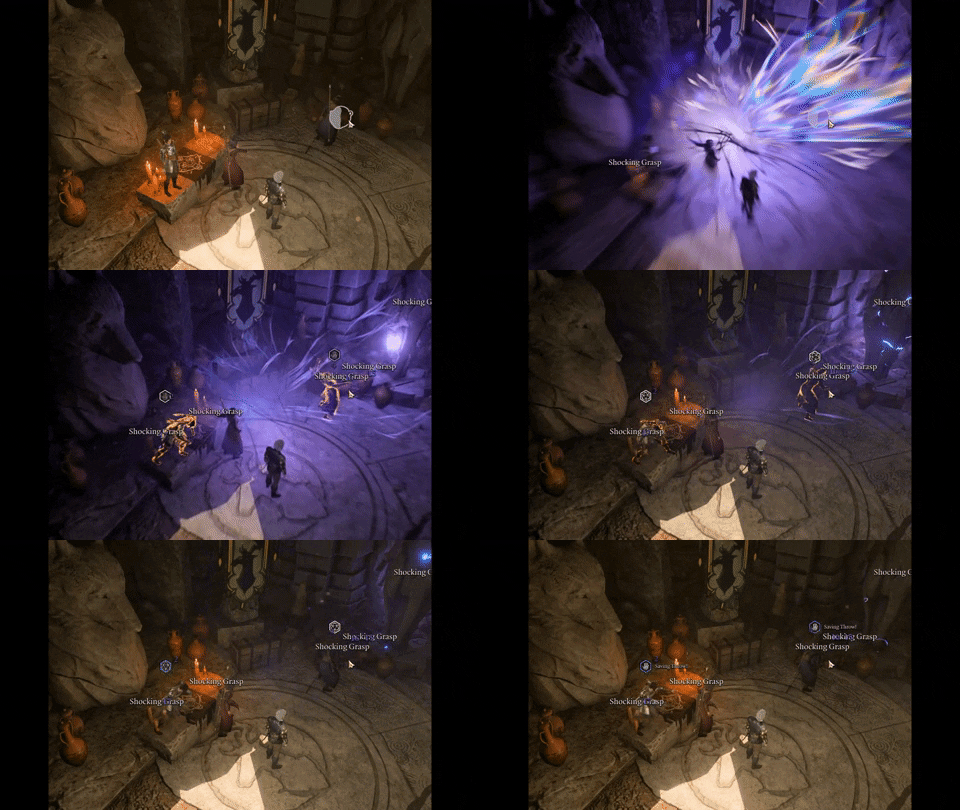
- Level 3 :** Spell of Charge of Lightning** - 3d8 Lightning damage.
- Level 3 : Spell of Explosive Fireball - 5m radius 6d6 fire damage.
- Level 2 : Spell of Barkskin - Touch a willing creature. It gains Barkskin until a long rest or until concentration is broken.
- Level 1 : Spell of Cure Wounds - A creature you touch regains 1d8+10 Hit Points.
**
****Example **
**Cape of the Master Druid - **Spell Charge Of Lightning
Compatibility
This mod has been packaged in such a way that it will/should be compatible with any mod in your load order.
Install Methods
See below for a few different install methods available for popular Mod Managers used for Baldur's Gate 3.
Also, manual install methods have been included. Please choose the method that is right for you.
Method 1 - Vortex
1. (Use Vortex to install automatically)
Method 2 - **BG3 Mod Manager **
-
Extract the archive.
-
Copy paste the .pak file into C:\Users\YourPCName\AppData\Local\Larian Studios\Baldur's Gate 3\Mods
-
Open BG3 Mod Manager and drag the mod from the right window to the left window.
-
Click the "Export Order To Game" button (this writes the mod settings)
-
Install complete, start your game
Method 3 - **Manual **
-
Extract the archive.
-
Copy the .pak file from the extracted archive.
-
Paste into: C:\Users(Your PC Name)\AppData\Local\Larian Studios\Baldur's Gate 3\Mods
-
Navigate to: PlayerProfiles[Profile Name]\modsettings.lsx
-
Open modsettings.lsx with your notepad or similar app.
-
Add these lines under <node id="ModOrder"> <children> NOTE - These lines can be copied from the code below)

- Save the file
8. Install complete, Enjoy!
<?xml version="1.0" encoding="UTF-8"?>
<save>
<version major="4" minor="0" revision="9" build="331" />
<region id="ModuleSettings">
<node id="root">

  <children>

    <node id="ModOrder">

      <children>

        <node id="Module">

          <attribute id="UUID" value="28ac9ce2-2aba-8cda-b3b5-6e922f71b6b8" type="FixedString" />

        </node>

        <node id="Module">

          <attribute id="UUID" value="8f370266-98ab-4cc9-9ac3-b57c73cd1cb6" type="FixedString" />

        </node>

      </children>

    </node>

    <node id="Mods">

      <children>

        <node id="ModuleShortDesc">

          <attribute id="Folder" value="GustavDev" type="LSString" />

          <attribute id="MD5" value="4fdef99ec596bb9d2d254e10f2c32a91" type="LSString" />

          <attribute id="Name" value="GustavDev" type="LSString" />

          <attribute id="UUID" value="28ac9ce2-2aba-8cda-b3b5-6e922f71b6b8" type="FixedString" />

          <attribute id="Version64" value="144115832324585265" type="int64" />

        </node>

        <node id="ModuleShortDesc">

          <attribute id="Folder" value="ImprovedHalsinReward" type="LSString" />

          <attribute id="MD5" value="" type="LSString" />

          <attribute id="Name" value="ImprovedHalsinReward" type="LSString" />

          <attribute id="UUID" value="8f370266-98ab-4cc9-9ac3-b57c73cd1cb6" type="FixedString" />

          <attribute id="Version64" value="21" type="int64" />

        </node>

      </children>

    </node>

  </children>

</node>
</region>
</save>
Un-Install
Method 1 - **Vortex:
**1. Use Vortex to un-install automatically.
Method 2 - **BG3 Mod Manager: **
-
Drag and drop the mod from the left window to the right window in BG3 mod manager
-
Click the "Export Order To Game" button (this writes the mod settings)
-
Remove the .pak file from C:\Users\YourPCName\AppData\Local\Larian Studios\Baldur's Gate 3\Mods3.
Uninstall complete.
Method 3 - **Manual: **(Installed Optional File)
-
Navigate to: C:\Users(Your PC Name)\AppData\Local\Larian Studios\Baldur's Gate 3\Mods
-
Highlight and delete the mod
-
Navigate to: PlayerProfiles[Profile Name]\modsettings.lsx
-
Open modsettings.lsx with your notepad or similar app.
-
Remove these lines under <node id="ModOrder"> <children>
-
Save the file
-
Un-Install complete.
**Check Out My Other BG3 Spell Mods
**


And if you like this mod, Endorsements are very much appreciated, Thank You!!!
CREDITS
clintmich - Author
Larian Studios - For an amazing game
GIMP - For the image manipulation software
Norbyte - For the converter app
ShinyHobo - For BG3 Mod Helper
FPOD - For essential compatibility info to package BG3 mods
Nexus Sites - For the amazing modding community
Gamers - You! Thanks for downloading and playing! Cheers!
来源与文件
文件说明
Improved Halsin Reward
来源列出的依赖与关系
- 作者列出的前置:Baldur's Gate 3 Mod Fixer
前往 N 网打开所选文件。安装与下载要求以原作者及平台说明为准。
<!-- aoe-mods-source:nexusmods:baldursgate3:100 -->