WSKr Loader(《鸣潮》专用 Special K)
使用本 Mod 前请注意:请将解压后的注入器所在文件夹添加到杀毒软件的排除项。由于该工具的运行方式,杀毒软件会将其检测为木马(至少 Windows Defender 会这样)。这是因为程序会从注入器启动一个进程;如果在配置文件中禁用“autorun\target”变量,杀毒软件就不会触发警报。作者表示之后会单独上传代码,以便有疑问时查看……(原文截断)
0浏览
0下载点击
0点赞
0收藏
关于这个 Mod
Clarifications Before Proceeding with This Mod:
- Make sure the folder containing the unzipped injector is excluded from your antivirus: Due to the way this tool is programmed, antivirus software will detect it as a Trojan (at least Windows Defender does). This happens because we launch a process from the injector (if you disable the "autorun_target" variable in the configuration file, the antivirus will not trigger an alert). I will upload the code in a separate file later, in case you have any questions about this tool.
- The download file contains only a text file with a link to another hosting service where the actual file is located: Given how restrictive GB is regarding .exe files (and the fact that a previous tool I uploaded here is still under review XD), I decided to upload the compressed file containing the injector elsewhere.
- Risk of account bans: It’s probably not much different from the risk of using skin mods. So we had to be sure... FOR NOW (unless KuroGames decides to permanently ban mods).
Since Wuthering Waves has serious performance issues, I tried using other methods to improve stability somewhat and avoid micro-stuttering in certain areas during gameplay. By default, Wuthering Waves can likely use Special K via the latter's global frontend (SKIF), but I haven't tested it, and from what I've gathered, it isn't very reliable.
Based on the library injection method (like the one used by XXMI), I created a program to inject the Special K DLL for this specific case.
However, there is a catch: if you try to inject Special K using the filename SpecialK64.dll, the game crashes and, in some instances, stops working entirely until you log out and log back in (likely due to an anti-cheat mechanism preventing the game from running again). Therefore, I have to use the DLL renamed as d3d11.dll.
New Information: After trying it with the injector, it is possible to use the filename SpecialK64.dll. You will notice the difference as soon as the game starts, as an additional notification will appear at the top of the screen. However, doing this makes it more likely that the anti-cheat will clearly detect the use of SpecialK (this is just speculation; I don't know how the anti-cheat works at the kernel level... but if it works like it does on Android, it can likely identify the names of loaded DLLs).
But wouldn't that cause problems if we want to use WWMI/3Dmigoto?
And that’s how it is... so, we need to take several steps. First, we will extract the injector's contents into any folder (we need to create a folder for the injector). Once the contents have been extracted, you will see a "WSKr_config.ini" file. In this file, you can configure the injector's settings. Most parameters are already set up and ready to go; you simply need to change the path where your game is installed. You should enter this in the "target_path" variable:
 Variables:
- "target" Specify the name of the executable the injector should target. In this case, Client-Win64-Shipping.exe.
- "target_allow_args" It allows the use of startup arguments for the "target" defined above. It accepts values such as
**true**or**1**. Any other value or content is treated as invalid or as a negative value (disabled). If you use**true**as the option, ensure you write it in lowercase. - "target_args" Here you specify the startup arguments for the target described above. This variable will be omitted if target_allow_args is disabled.
- "autorun_target" Indicates whether you want to start the target from the injector. Accepts values such as true or 1. Any other value or content is treated as invalid or as a negative value (disabled). If you use
**true**as the option, ensure you write it in lowercase. - "module" Specifies the name of the DLL file to inject. In this case, SpecialK64.dll (or d3d11.dll if you prefer).
- "OptiScaler_enable" Specify whether you want to inject OptiScaler alongside the previously assigned module. Accepts values such as true or 1. Any other value or content is treated as invalid or as a negative value (disabled). If you use
**true**as the option, ensure you write it in lowercase. NOTE: Using OptiScaler in this way causes the Steam overlay to stop working. I assume this is because both use the same methods to perform their operations.
Once this is done, upon launching the injector, the game should run with Special K active:

Okay. Special K works... But what about skin mods?
Okay, for WWMI to work, we need to add WWMI's d3d11.dll as a plugin. To do this, open the Special K control panel while the game is running by pressing "Left Ctrl + Shift + Backspace." Once in the menu, navigate to the Plugins > Add Plug-In section. Locate your WWMI installation on your PC and select d3d11.dll. Then, ensure the load order for d3d11.dll is set to "Lazy": Once this is done, restart the game from the Injector, and WWMI should have loaded as a Special K plugin:
 Well, that would be all... There's nothing left...
Wait... What if I want to launch it from XXMI Launcher?
That’s not a big problem. To do this, go to XXMI > Settings (the gear icon in the top right) > Advanced section. Here, we must disable WWMI (3dmigoto) injection. To do this, we add the following variables:
- Run Pre-Launch: REM
- Custom Launch: start "WSKr Launcher" /d "- Your WSKr Loader Path -" WSKr.exe
Make sure the "Custom Launch" variable is set to "Bypass," as shown in the following screenshot:
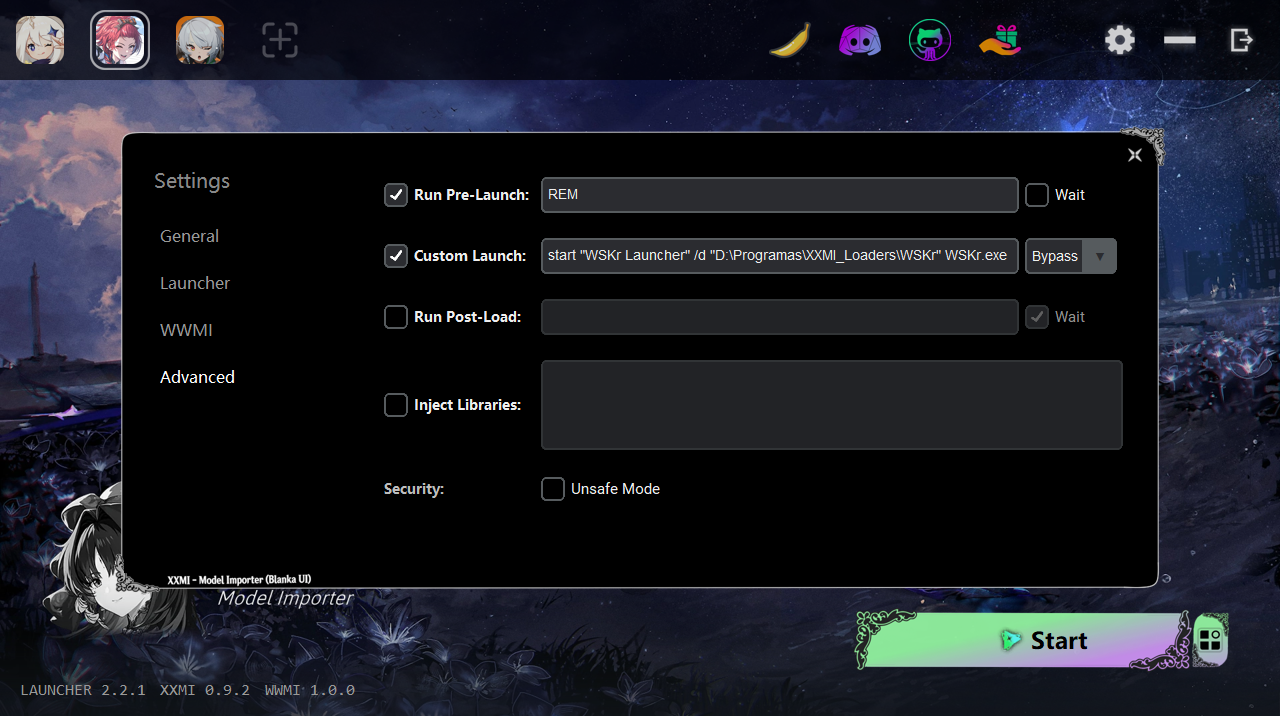 Alright then... With this done, you can launch Special K directly from XXMI (this allows you to stay up to date with WWMI updates while injecting Special K).
Compatibility with other libraries
It is very likely to work with other libraries, but there are some that do not work quite right. Bear in mind that *Wuthering Waves* uses a heavily modified version of UE4 (incorporating technologies adapted from UE5). The libraries you could try using are the following:
- "WWMI" Is unnecessary, as XXMI handles this by default. In any case, it works using the filename d3d11.dll. WWMI is injected via Special K as a proxy DLL. Injecting it externally would only cause errors. Or perhaps WWMI would work, but Special K might encounter errors when trying to locate a DX11 device.
- "DXVK" Definitely does not work. It was usable in version 3.1, but currently, it causes D3D11 device errors that prevent the game from running at all. It uses the filenames d3d11.dll and dxgi.dll simultaneously. From what I’ve been able to gather, DXVK no longer works due to engine-level changes KuroGames made in recent versions of WuWa (apparently, it was already completely incompatible as of version 3.3).
- "Reshade" Works using the filename Reshade64.dll. If you are already using Special K, you can inject it from there. ReShade can be injected either as a DLL or as an ASI plugin; if you place ReShade64.dll in the same location as SpecialK64.dll (or its .ini configuration file), Special K should recognize ReShade immediately without any issues.
- "Ultimate ASI Loader" Might work... or it might not. I haven't tested it to find out. It uses the filename dinput8.dll, though it can also use others like winmm.dll. There wouldn't be much point in using it, since Special K has native support for ASI plugins and proxy DLLs, making it unnecessary.
Compatibility with other games
I haven't used the tool with other games, except for one. The result isn't encouraging... Genshin Impact Compatibility:
- "Reshade" Works. It uses the filename Reshade64.dll.
- "GiMi" Works similarly to the method used in XXMI or the old launcher. It uses the filename d3d11.dll.
- "OptiScaler" Hasn't been tested; it likely won't work. Recent tests indicate that it does work, but there is a high risk to your account. I am trying to bypass Windows and trick the DLL injection into thinking the game is located elsewhere. This might be implemented in future versions of HoyoWSKr.
- "SpecialK" Definitely doesn't work. Using the filename d3d11.dll or dxgi.dll causes the game to crash. Using the filename Specialk64.dll allows the game to run, but the game itself appears to ignore SpecialK's existence, so it is as if nothing was injected.
- "DXVK" Triggers an "illegal tool detected" warning and crashes the game. It uses both d3d11.dll and dxgi.dll simultaneously. I doubt there is a solution for this.
- "Ultimate ASI Loader" hasn't been tested. It is usually injected using the filename dinput8.dll. It might work, even with other names like winmm.dll, though it would likely be detected as an illegal tool. If it isn't detected, you could potentially inject several of the aforementioned tools (specifically Reshade and OptiScaler) as ASI plugins. It definitely works. It remains isolated from the game. It uses the filename dinput8.dll (though other names might also be valid). It is now the core foundation of HoyoWSKr.
For Genshin Impact, I reactivated an old mod I created two years ago (clearly back when I lacked experience) called TwoLaunch. Unfortunately, the site's moderation team still has it "under review" to this day. You can check it out here if you're interested. TwoLaunch is designed solely to launch GiMi and Reshade simultaneously either via a custom launcher like Collapse Launcher or manually by launching the game yourself (the tool doesn't handle the actual game launch, as that is managed by Collapse Launcher).
Potential issues when using OptiScaler
You may encounter issues when using OptiScaler via WSKr. If this happens, I recommend downloading OptiScaler from its official GitHub repository, deleting the entire contents of the "OpS" folder included with WSKr, and moving the OptiScaler files into that folder instead. Then, proceed with the installation (run the .bat file included with OptiScaler) and ensure that OptiScaler is set to use dxgi.dll as the injection library.
If OptiScaler fails to detect the necessary libraries upon launching the game, you can try moving the contents of the "libs" folder (excluding the OptiScaler configuration file and dxgi.dll, of course) into the game folder. Since these libraries will be loaded via the injected dxgi.dll, the game should not detect them as a client modification, so you shouldn't trigger any alerts that could lead to a ban.
来源与文件
- 原作者:Kokokuro*
- 原项目:WSKr Loader (Special K for Wuthering Waves)
当前文件
- kurowskrsquashfs.7z(ID:1791682),111648768 字节 Injection code changed
归档文件
- wskr_ba018.zip(ID:1758111),135924736 字节 This file contains WSKr Loader tool, and OptiScaler files
- GameBanana 项目版本:1.0.0.1
来源贡献名单
- Key Authors
- Kokokuro*
前往 GameBanana 原作品页面。安装与下载要求以原作者及平台说明为准。
<!-- aoe-mods-source:gamebanana:20357:mod:694359 -->
你可能也喜欢
更多 鸣潮 Mod
Hsin——简约红白
这个模组从上个月就开始制作,从配色设计、贴图到模型修改和最终调试,断断续续忙了一阵,今天终于完成。这是一款重新配色作品,沿用我之前“Qingxiao - Star Purple”的风格。主色调为红、白、金,主题是异域边疆/外域风格。裸身基础模型直接采用我另一个“Hsin - Origin Toggle”模组,身材比例和体型会与原版完全一致。